
FidelityAgent ONE
PalmAgentFinance
4.2131.00 Reviews
- Version
- 4.8.5.1.5
- Installs
- 50.00K
- Age Rating
- Everyone
Screenshots
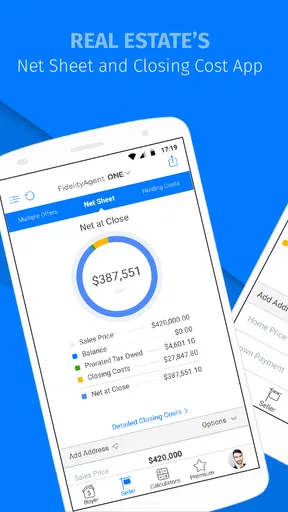
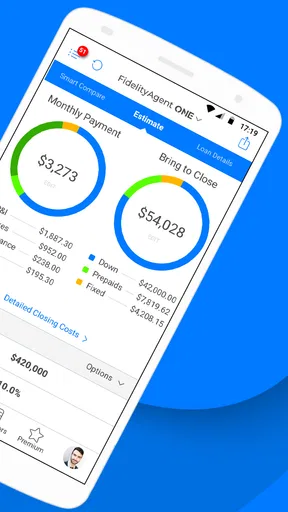
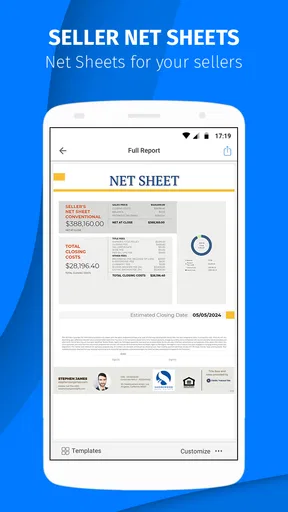


Our Review of FidelityAgent ONE
 Analysis by Appyee
Real estate work often breaks into small, time-sensitive tasks: checking information before a showing, keeping a client conversation moving, or getting through an administrative step while away from a desk. FidelityAgent ONE is built for that professional setting rather than for general personal finance. I found its value easiest to understand when treating it as a mobile companion for real estate work, not as a replacement for every office system an agent may already use.
The app comes from PalmAgent and sits in the finance category, although its audience is much narrower than that label suggests. It is free to download, rated for Everyone, and has reached over 50 thousand installs. Its average rating is 4.2 from around 300 ratings, which gives a useful indication of steady interest without suggesting that it will suit every kind of property professional.
How I would build a dependable daily workflow
My first recommendation is to decide what job the app will handle before relying on it during a busy appointment. A mobile tool becomes frustrating when it is treated as a complete office in a pocket, especially when the user expects it to replace document storage, messaging, transaction management, and financial planning all at once. FidelityAgent ONE makes more sense as one focused part of a real estate routine.
A practical baseline begins before leaving the office. I would open the app, review the information needed for the next appointment, and make sure I understand which steps belong inside the app and which still require another system. That simple separation prevents a common mistake: assuming that a finance-oriented real estate utility should also be the central place for every note, file, and client conversation.
For an agent moving between listings, the useful habit is to prepare around the next decision rather than browse without a purpose. If a buyer asks a question during a showing, I would use the app for the relevant professional task, then record any follow-up in the normal system used by the team. This keeps the mobile session short and reduces the chance of leaving important client details scattered across several places.
The same approach works for an office administrator or transaction coordinator. Instead of opening the application repeatedly throughout the day without a plan, I would group related checks together. A morning review, a quick pre-appointment check, and an end-of-day confirmation are easier to repeat than a stream of improvised taps. The benefit is not flashy; it is consistency.
One useful trade-off appears here. A specialist app can feel faster than a broad real estate platform because its purpose is more defined, but that focus also means I would not expect it to organize an entire business. Teams that already have a full transaction platform may prefer using FidelityAgent ONE for the particular workflow it supports while keeping records and communication elsewhere.
What a realistic appointment looks like
Imagine an agent has two property meetings on opposite sides of town. Between them, a client asks for a quick answer connected to the transaction or financial side of the work. The agent can open FidelityAgent ONE, complete the relevant check while the question is fresh, and then return to the conversation without carrying the task mentally for the rest of the day.
The important habit is to verify the result before presenting it as final. Mobile convenience can encourage rushed decisions, especially when the user is standing outside a property or working with a weak connection. I would treat the app as a way to support a professional judgment, not as permission to skip the normal review process.
After the appointment, I would make a short note in the team’s established record system. That extra step may feel repetitive, but it creates a reliable handoff for colleagues. It also answers a practical question many users have: whether the app alone is enough for a team workflow. In my view, it is better used alongside established records unless the organization has explicitly built its process around it.
Settings and setup choices worth checking
The current version is 4.8.5.1.5, and the app supports devices running Android 7.0 or later. Before making it part of a daily routine, I would check that the phone meets that requirement and then spend a few minutes looking through the available settings and account-related choices. I would not change options simply because they exist; I would adjust only what makes the app easier to use during real appointments.
First, I would look for ways to reduce unnecessary interruptions. A finance tool used by an agent should fit around conversations, driving, and scheduled meetings. If the device or app offers notification controls, I would keep only the alerts that help me act. Too many prompts can turn a useful assistant into another source of noise, while too few can make a time-sensitive task easy to miss.
Next, I would check display and navigation preferences that affect quick reading. An agent may use the app indoors, outdoors, or in a moving schedule where there is little patience for crowded screens. Larger text, a comfortable display setting, and a predictable starting point can matter more than a long list of advanced options. These are small adjustments, but they make repeat use less tiring.
I would also review the way the app handles sign-in and session continuity on the device. This is especially important when a phone is shared, managed by an office, or occasionally handed to a client. A convenient login should not lead to careless access. The right balance depends on the user’s workplace rules, but the general principle is clear: make the routine quick without treating a professional device as if it has no privacy concerns.
Another worthwhile check is the app’s update behavior. Keeping the current release installed is sensible, but I would avoid updating immediately before a major appointment if the device allows that choice. A stable, familiar workflow is more valuable than experimenting with changes at the exact moment a client is waiting. The app is free, although in-app purchases range from $0.99 to $9.99 per item, so I would also review any purchase prompts before allowing them into a team routine.
That last point is easy to overlook. Free installation does not automatically mean that every part of the experience has the same cost structure. I would make sure colleagues know who is authorized to approve an optional purchase and whether the feature is genuinely needed. This is a practical safeguard for small agencies where several people may use devices connected to the same business process.
Repeatable patterns that make the app feel faster
The fastest users are not necessarily the ones who tap quickly. They are the ones who remove decisions from repeated tasks. I would create a simple personal sequence: open the app for a defined purpose, complete the necessary review, confirm the result, and close with a note about the next action. Repeating that sequence makes the app easier to use under pressure.
A second pattern is to prepare questions before opening the app. Instead of searching broadly, I would write down the exact point that needs checking. This is particularly helpful for professionals who move between listings and client calls. A narrow question leads to a shorter session and makes it less likely that a user will confuse an old result with the current matter.
Experienced users can also pair the app with calendar habits. Before a property meeting, I would review the appointment details and then open FidelityAgent ONE only for the related professional task. Afterward, I would mark the follow-up in the calendar or office system. The app does not need to become the calendar to be useful; it can occupy one clearly defined step between preparation and follow-through.
For teams, the best shortcut is often a shared procedure rather than an undocumented trick. I would write a short internal guide explaining when to use the app, what must be checked before relying on an output, and where the final client-facing record belongs. That approach is more dependable than assuming every agent will discover the same workflow independently.
There is also a useful distinction between speed and completeness. If I am answering a quick operational question, a focused mobile session is ideal. If I am making a complicated financial decision, comparing several scenarios, or preparing formal material for a client, I would move to the organization’s fuller tools and review process. The app can shorten the path to an answer without being the right place for every answer.
Where the specialist approach has limits
The biggest limitation is scope. FidelityAgent ONE is aimed at real estate professionals, so a casual user looking for a general budgeting app, a personal investment dashboard, or a household money tracker should probably choose a different category of product. The professional focus is its reason for existing, but it also makes the app a poor fit for people who do not work in property transactions.
Even within real estate, not every role will benefit equally. An agent who spends most of the day in a comprehensive desktop platform may find the mobile app useful only for occasional checks. A brokerage that requires all work to stay inside a particular enterprise system may also have little reason to add another tool. In those cases, the extra app could create duplicated work rather than removing it.
There is a second limitation in mobile context. A phone is convenient, but it is not always the best screen for careful comparison or detailed review. I would avoid making important decisions while distracted, walking between meetings, or speaking with a client at the same time. A larger screen and a deliberate office review are better when the task involves multiple pieces of information or a formal approval.
Users should also think about continuity. A useful mobile habit depends on having the right account access, a compatible device, and a clear place to store the resulting information. If an agent changes phones, moves between offices, or works with several teams, the process should be tested before it becomes essential. Convenience is only real when the workflow survives ordinary changes in the working day.
The purchase model deserves a measured view as well. The app costs nothing to download, but optional items can add expense. That does not make it a bad choice, yet it means managers should distinguish between the core workflow and extras before recommending it across a team. For an individual professional, the decision is simpler: try the free experience, identify the exact task it improves, and avoid paying for an option that does not save meaningful time.
Compared with a general finance app, this one is more relevant to property professionals and less useful for personal money management. Compared with a broad real estate platform, it may be easier to keep focused on a specific mobile task, but it should not automatically be expected to provide the depth of a complete office suite. That is the central trade-off: specialization can reduce clutter, while a broader platform may offer more connected tools in one place.
Who should use it and who should skip it
I would recommend trying FidelityAgent ONE if you work in real estate and regularly need a mobile way to support finance-related professional tasks. It is especially worth considering if your day includes property visits, short gaps between appointments, and a need to check information without returning to a desk. The free entry point makes testing the workflow relatively straightforward, provided the app fits your organization’s process.
I would be more cautious if you are a new agent hoping for a complete business-management system. You may still find value in it, but you will need separate tools for the other parts of the job. Likewise, a user who wants personal budgeting or everyday banking should skip it and look for an app designed around household finances rather than real estate work.
For a brokerage, I would run a small trial with a clearly defined task instead of requiring everyone to adopt it immediately. Ask agents to use the same preparation and follow-up routine, then compare whether it reduces repeated office work or merely adds another place to check. That test reveals more than a download count or a short description because it measures fit with the actual business process.
My verdict after settling into the workflow
FidelityAgent ONE is most convincing when used with discipline. I would not install it expecting a universal solution, but I can see why a real estate professional might keep it available for focused mobile work. Its strongest quality is the possibility of making a narrow task easier to repeat while an agent is away from a desk.
The rating of 4.2 suggests a generally positive reception, and the app’s long presence since its September 9, 2012 release gives it a history that newer tools do not have. Still, neither point removes the need to test it against your own brokerage process. A mature app can be dependable for one workflow and irrelevant to another.
My practical advice is to start with one recurring scenario, such as preparing for a property meeting or handling a short between-appointments check. Review the settings, keep the sequence consistent, and record the final outcome in the system your team already trusts. If that routine saves effort without creating duplicate records, expand its role gradually.
My bottom line: this is a focused finance app for real estate professionals, not a general-purpose money manager or a complete replacement for a full property platform. I would recommend it to agents who value a repeatable mobile workflow and understand its boundaries. I would skip it if your needs are personal finance, broad office management, or a single all-in-one system. Used in the right place, it can be a practical companion; used as the entire business, it is likely to feel limited.
Verdict
Strengths of FidelityAgent ONE
- Centralizes client data, tasks, and communications in one workspace.
- Helps agents track leads and follow-ups more consistently.
- Supports collaboration between team members and office staff.
- Can reduce repetitive administrative work through workflow tools.
- Useful for maintaining a clearer overview of active transactions.
Limitations of FidelityAgent ONE
- Requires setup and training before teams can use it efficiently.
- Some features may depend on your brokerage’s enabled configuration.
- The interface can feel busy when handling many clients or transactions.
- Performance and available tools may vary by device or account access.
- Not ideal for users seeking a simple, personal contact-management app.
Other Releases by PalmAgent
View All


Similar Picks in This Category
View All
Google Wallet
Google LLC4.3

Airtel: Recharge, Bank & Loans
Airtel4.0

PayPal - Pay, Send, Save
PayPal Mobile4.2

DANA Indonesia Digital Wallet
PT Espay Debit Indonesia Koe4.5

Binance: Buy Bitcoin & Crypto
Binance Inc.4.8

Cash App
Block, Inc.4.7
Frequently Asked Questions
What is FidelityAgent ONE, and who is it designed for?
FidelityAgent ONE is a mobile platform intended to support real estate professionals with tools for managing listings, communicating with clients, organizing contacts, and handling daily business tasks. It is primarily aimed at agents and teams connected with Fidelity National Financial’s real estate ecosystem. Before downloading, users should confirm that their brokerage, organization, or account is supported, since access and available features may depend on their professional affiliation.
Do I need an account or an invitation to use FidelityAgent ONE?
Yes, the application is generally designed for registered real estate professionals rather than casual users. During testing, access to the main features depends on signing in with valid professional credentials, and some users may need an invitation, organization approval, or an account supplied through their brokerage. Downloading the app alone does not guarantee access, so it is best to verify eligibility before installing it.
What features can I expect to find in FidelityAgent ONE?
FidelityAgent ONE focuses on bringing several real estate workflow tools together in one place. Depending on the user’s account and organization, the app may provide access to property or transaction information, contact management, notifications, communication tools, and business resources. The exact feature set can vary, so users should not assume that every tool shown in promotional material will be available under every brokerage or subscription.
Is FidelityAgent ONE free to download and use?
The app may be available to download without an upfront charge, but that does not necessarily mean every service is free. Access can depend on a participating brokerage, employer, professional account, or related Fidelity service agreement. Some functions may also require authorization from an administrator. Before relying on the app for business, review the terms shown in the app store and confirm any costs with your brokerage or account representative.
What privacy and device permissions does FidelityAgent ONE require?
Because FidelityAgent ONE is intended for professional communication and real estate administration, it may request permissions such as notifications, contacts, camera access, storage, or location, depending on the features you use. These permissions can support messaging, document handling, alerts, or property-related workflows. I recommend checking each permission request carefully, reviewing the developer’s privacy policy, and disabling access that is not necessary for your work.
